
education
Mei-Lin Signs: Drill Only the Road Signs You Keep Getting Wrong
A focused flashcard app for Taiwan scooter-licence retakers that renders every road sign offline, weights your weak spots, and counts down to exam day.
Artem
Founder
· 5 min read
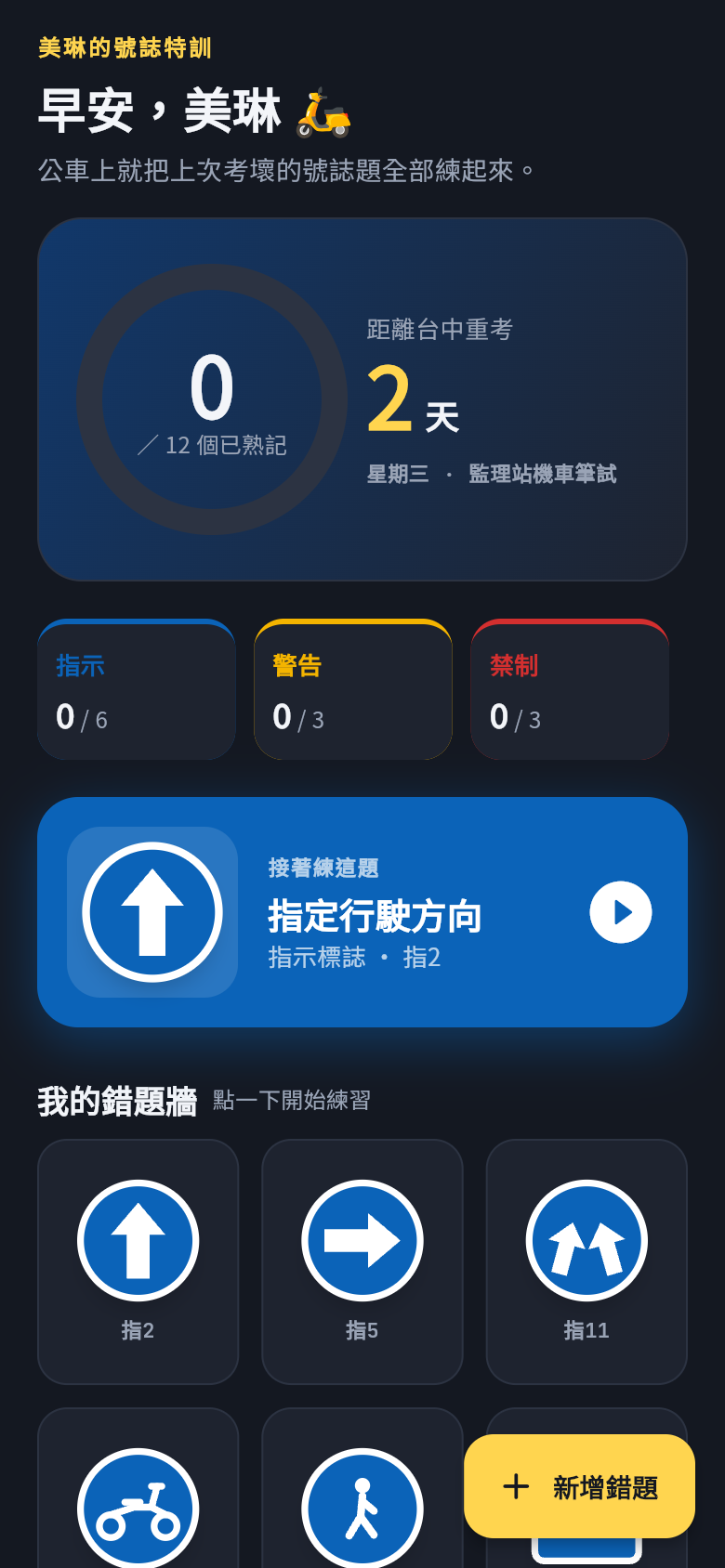
Mei-Lin had studied the whole question bank twice. She knew the speed limits, she knew the right-of-way rules. But on her second attempt at the Taiwan 機車 theory test in Taichung, the blue mandatory signs got her again. 指示標誌 look so similar to each other under exam pressure, and the test gives you no second glances. Her retake was booked for the following Wednesday.
So she described the problem to Leanfinit in a single sentence, and within minutes she had a working app on her phone. Not a generic flashcard tool, not another 800-question question bank she'd have to wade through. Something that showed her only the signs she had gotten wrong, weighted heavily toward the blue 指示 signs that kept tripping her up, and that worked completely offline on her morning bus commute.
Live demo
The problem with studying everything equally
Most road-sign study tools hand you the full catalogue: 警告, 禁制, 指示, all mixed together. If you already know that a red circle with a car means no entry, drilling it again is wasted time. What Mei-Lin needed was a tool that remembered her mistakes and stopped boring her with the questions she had already mastered.
The app solves this with a simple weighted queue. Signs you got wrong come back sooner. Signs you keep getting wrong come back even more often. Signs you nail three times in a row start fading from the rotation. The blue mandatory signs, which are the category that sank her score, get extra weight by default, because that is the part of the exam where most retakers lose their points.
Try it in the demo above. Tap through a few signs and get one wrong deliberately. Notice how it cycles back before the ones you got right. That is the whole trick: the app does the prioritisation for you, so you do not have to think about what to study next.
Every sign rendered without a single image file
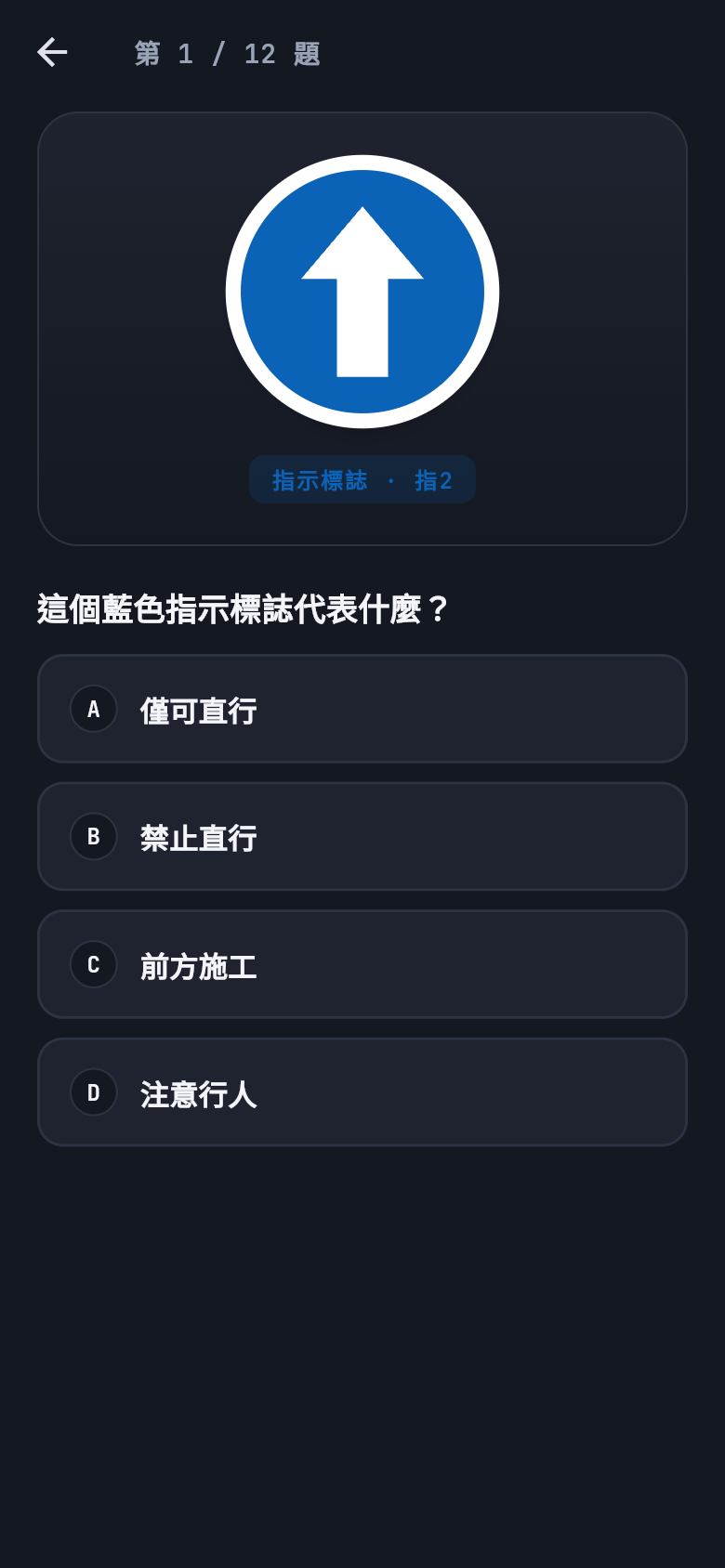
Taiwan road signs follow precise geometric rules set by the Ministry of Transportation: specific colors, border thicknesses, and symbol proportions. The app draws every one of them in code, using vector shapes and text, with no image assets at all. That is what makes it fully offline. There is nothing to cache, nothing to load, nothing that breaks when the bus goes through a tunnel.
This matters more than it might seem. A commute study session that stalls on a loading spinner is a session that does not happen. The app opens instantly, works in airplane mode, and renders cleanly at any screen size. The sign you are looking at on a cramped bus seat looks the same as it does on a wider phone in good lighting.
In the screenshots, you can see how the blue 指示 signs look compared to the red 禁制 prohibition signs. The colour boundary is obvious when you see them side by side. Under timed exam conditions, when you are reading a question and glancing between options, the difference can blur. Drilling them in isolation, sign by sign, is what trains your eye to tell them apart automatically.
Adding your own problem signs and tracking mastery
The default set covers the signs that appear most often in the wrong-answer pile for retakers. But Mei-Lin also kept blanking on one specific 指示 sign that the default set did not weight highly enough. The app lets her add it herself, typing the sign name and tapping the category, and it joins the rotation immediately with the same mastery tracking as everything else.
Each sign has a small progress indicator. After enough correct answers in a row, the sign is marked as mastered and its frequency in the rotation drops. The exam countdown in the corner, showing days until her Wednesday retake, turns the whole thing into a sprint with a visible finish line. That combination, targeted weaknesses plus a deadline, is what makes a short bus ride feel productive rather than arbitrary.
Multiple-choice answers are shuffled on every pass, so the answer position does not become the cue. This is a small thing that most flashcard apps skip, and it is the difference between learning the sign and learning that the correct answer is always the second option.
Built for the bus, not the classroom
The entire interface is in Traditional Chinese. The sign names, the category labels, the feedback messages, all of it. This is not a translation toggle bolted on afterward. It was the default, because Mei-Lin studies in Chinese and reading in a second language while memorising visual information would add an unnecessary cognitive load.
Sessions are designed to be short. There is no required study time, no lesson flow, no progress bar you have to complete before closing the app. You open it, you drill a few signs, you close it. When you open it again on the same commute or the next morning, it picks up from where the mastery scores left off. The state persists locally, again with no network required.
Most people who fail the road-sign section of the Taiwan theory test the first time do not fail because they have not studied. They fail because they studied everything instead of the things they do not know. This app is the correction for that, built in the time it takes to describe the problem out loud.
39
files in the build
40.5 MB
app bundle
Flutter Web
runs in any browser
Have a study problem that needs a tool?
Mei-Lin described her exact problem in one sentence and got a working app she could use that same evening. If there is a gap in your own preparation, or any recurring task that generic apps handle poorly, describe it and see what gets built.