
utilities
Grendon Bins: Never Wheel Out the Wrong Colour Again
A simple, offline-ready app that tells Malcolm — and anyone on a rotating kerbside round — exactly which bin goes out this Thursday, no guesswork needed.
Artem
Founder
· 5 min read
Wednesday evening, teatime, and Malcolm is standing at the front door wondering if this week is blue box week. The council calendar is somewhere in the utility room, maybe under the seed catalogues. Last week he wheeled out the green bin and the lorry sailed right past the blue recycling he'd forgotten. The week before, same story, opposite colour.
Grendon Bins is a small, focused app built for exactly this situation. Open it and you see, immediately, which bin or bins belong on the kerb tonight — colour-coded, with a countdown to the next collection. No login, no internet connection required, no hunting through a printed timetable that was accurate in January and increasingly isn't.
Live demo
The fortnightly problem nobody warned you about
Most households manage weekly bins without much trouble. Green goes out every Thursday, brown too — easy enough to remember. The complication arrives with fortnightly recycling. Blue boxes collect on alternating weeks, and those weeks are tied to ISO week numbers, which means the pattern slips relative to the calendar dates every year. Week 1, week 3, week 5 — fine in theory, but in practice there is no quick way to check whether this particular Thursday is odd or even without either counting back from a known date or finding that paper calendar.
Over several years that uncertainty compounds. A long bank-holiday weekend shifts your mental model. A missed collection makes you unsure whether you were wrong about the week or the lorry just skipped you. After a while you start doing what Malcolm does: asking a neighbour, or hedging and putting out both bins, or simply guessing and hoping. Grendon Bins removes the guessing entirely by calculating the correct odd/even week for you and showing the result clearly before you need to act on it.
What you see when you open it
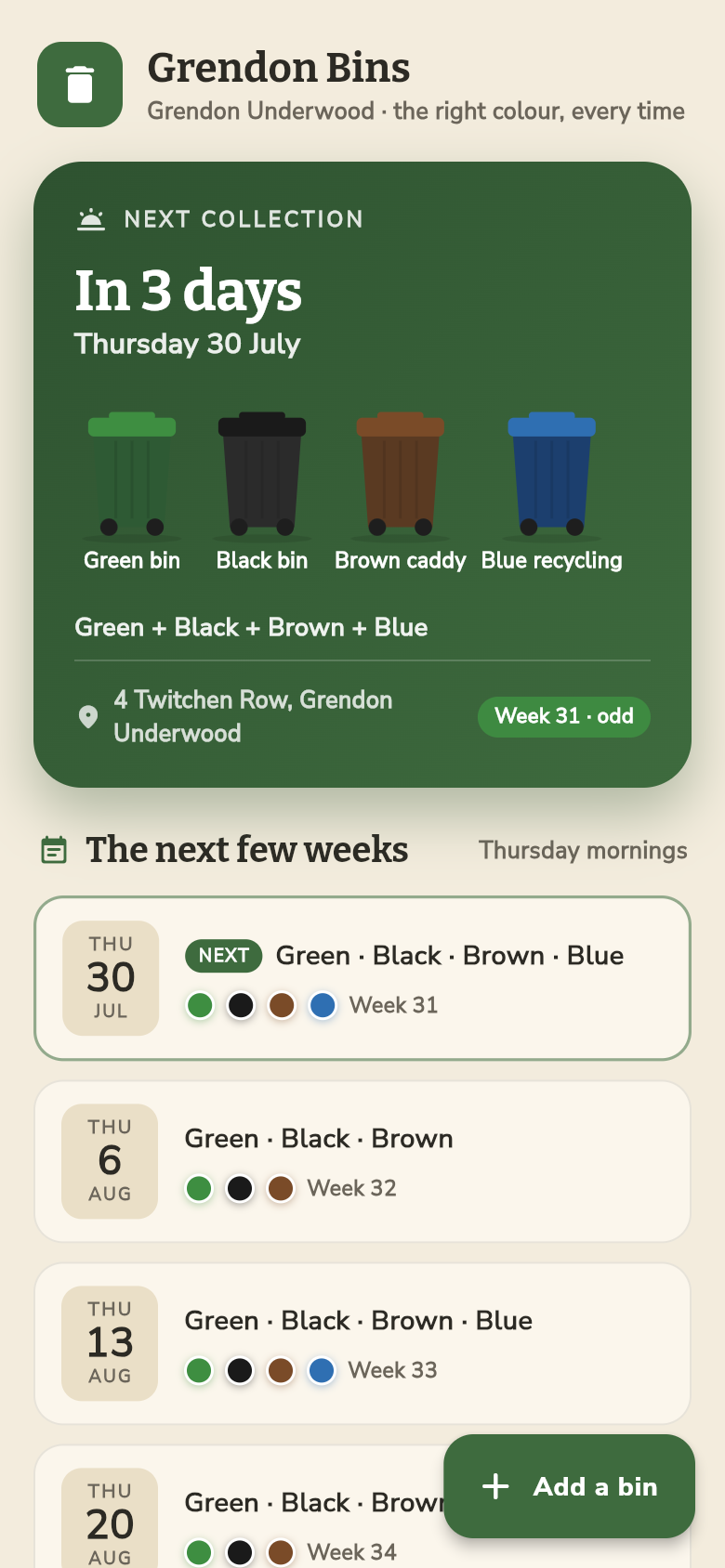
The main screen is a single view built around tonight's question. The next collection day sits at the top with a plain countdown — 'Tomorrow', 'In 2 days', or the actual day name if it's further out. Below that, the bins due on that day are shown as coloured blocks: the specific greens, blacks, browns, and blues that Grendon Underwood residents actually have, not generic grey icons.
The fortnightly blue recycling shows up only in the weeks when it genuinely applies, and hides itself the alternate weeks. There is no asterisk, no footnote, no 'check your council website'. The app has already done the arithmetic. Try it in the demo above: look at what's showing, then come back next week and see how the screen changes.
Below the current week, a short forward view lets you confirm the next couple of collections as well, which is useful if you're going away and want to know whether a neighbour needs to move your bin. Everything on screen is pre-filled for the Grendon Underwood Thursday round — you never land on a blank setup screen.
Offline first, by design
Rural broadband being what it is, and phone signal in the back garden being what it often is, Grendon Bins is built to work entirely without a connection. The schedule lives on the device. There is nothing to fetch, no account to log into, no server that needs to be up on a Thursday evening in January.
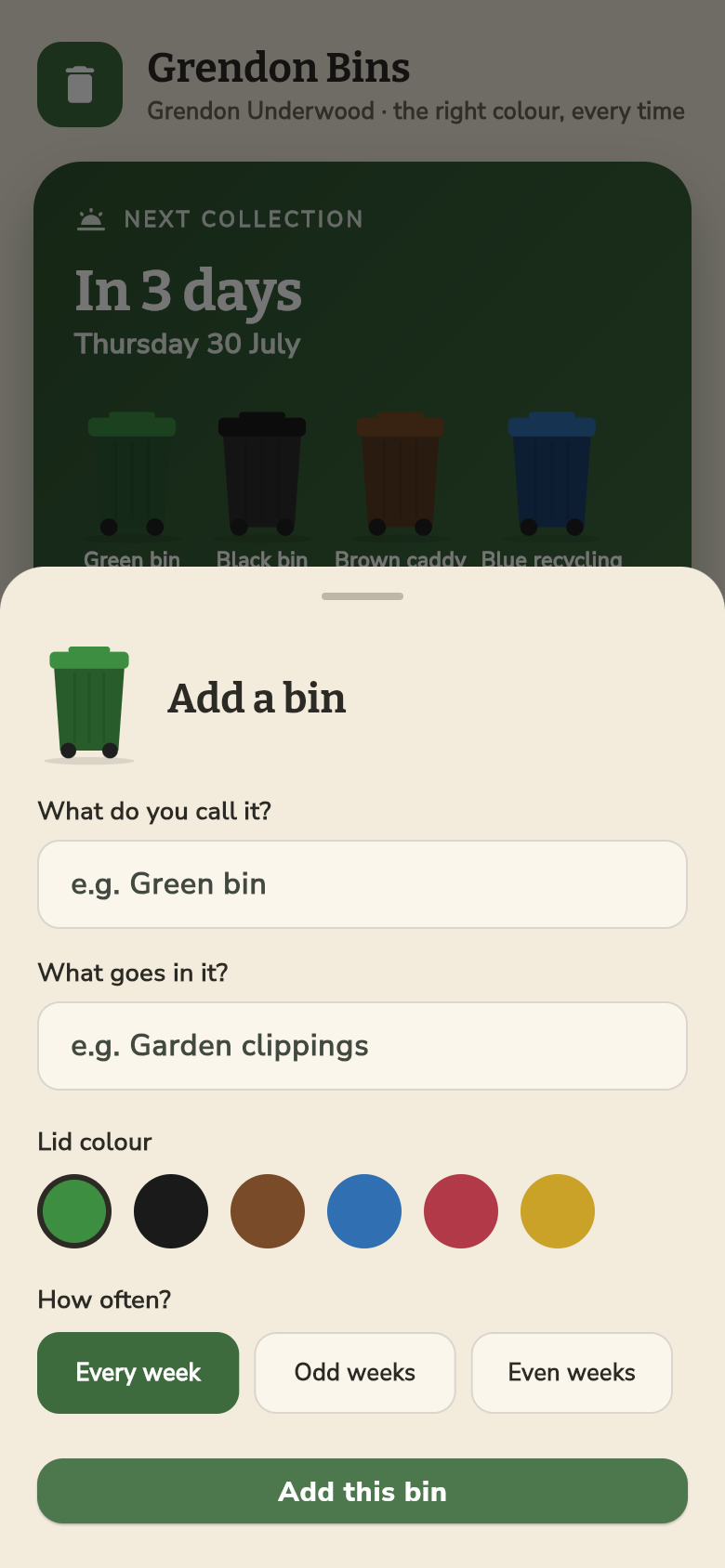
If your collection day or bin colours differ from the defaults — perhaps you're in a nearby village on a slightly different round, or your council has added a food waste caddy — there's a simple edit sheet where you can adjust colours, cadences, and collection days. Changes save immediately and the main screen updates to match. That's the full scope of configuration: the app stays small on purpose.
A tool shaped by one real problem
Most apps of this type are either generic (a plain calendar you have to populate yourself) or over-engineered (council integrations that break when the API changes, notification systems that need permissions and battery budget). Grendon Bins sits in neither camp. It was built from a single concrete frustration — three wrong-bin Wednesday evenings in a row — and the feature set goes exactly as far as solving that and no further.
The colour rendering matters more than it sounds. Green, black, brown, and blue are meaningfully different under a porch light at dusk, but a lot of apps represent bins as identical shapes with a label underneath. Here the colour is the information. The block is large, the contrast is high, and you can read it at a glance without your glasses.
The result is an app Malcolm can open in five seconds, confirm the answer, and put his phone away. No friction, no setup required each week, no dependency on a council website staying online. That's the whole idea.
Try it, then build your own
The live demo in the frame above is running the real app. Tap through the screens, see how the fortnightly recycling alternates week by week, and try the edit sheet if you want to adjust a bin colour or cadence. If your own bin day is on a different day, or your local authority uses slightly different categories, those fields are yours to change.
If you're dealing with a different recurring-but-irregular schedule — a medication rota, an irrigation cycle, alternating school pickup duties — the same logic applies. A focused, offline tool that knows your specific pattern is almost always more reliable than a shared calendar or a note on the fridge.
39
files in the build
40.4 MB
app bundle
Flutter Web
runs in any browser
Got a problem like this? Build your own tool.
Grendon Bins started as a one-line idea. Describe your own recurring headache and Leanfinit will turn it into a working app in minutes, no code required.